Cortex Scheduling System
The scheduling system lets you set up recurring or one-time agent invocations. Schedules persist to disk, survive restarts, and hot-reload when changed externally. Each fire opens a new session that runs the schedule's prompt. Daemon infrastructure loops such as provider-usage collection and memory-index rebuild use the built-in job controller described below rather than schedule records.
Waiting for something to finish? Do not schedule a poll
A schedule that fires only to check whether a job is done costs a full agent turn every time, and almost every one of those turns finds nothing. Arm a waitpoint instead: the job reports back when it finishes and the session wakes exactly once. Schedules are for work that should happen on a clock, not for watching something else.
Schedule Types
Four trigger types are supported:
| Type | Description | Key Parameter | Example |
|---|---|---|---|
interval |
Fire every N time units | interval (e.g., "5m", "1h", "30s") |
Run a status check every 5 minutes |
daily |
Fire at a specific time each day | time (HH:MM 24-hour format) |
Run a daily digest at 09:00 |
weekly |
Fire on a specific day of week at a time | dayOfWeek (0-6, 0=Sun), time |
Run a weekly review Monday at 21:00 |
once |
Fire once after a delay | delay (duration string) |
Send a reminder in 2 hours |
Duration strings follow the format <number><unit> where unit is s (seconds), m (minutes), h (hours), or d (days), case-insensitive, and the number may have a decimal part. Examples: "30s", "5m", "1.5h", "1d". A bare number in a string is rejected, so "30" never turns into 30 milliseconds; callers that pass JSON numbers (such as the Web UI) give milliseconds. Weekdays are sun..sat (case-insensitive) or 0-6, and times are 24-hour HH:MM with a two-digit hour (09:00, not 9:00) in the server's local time. The message is trimmed and must not be empty.
Managing schedules
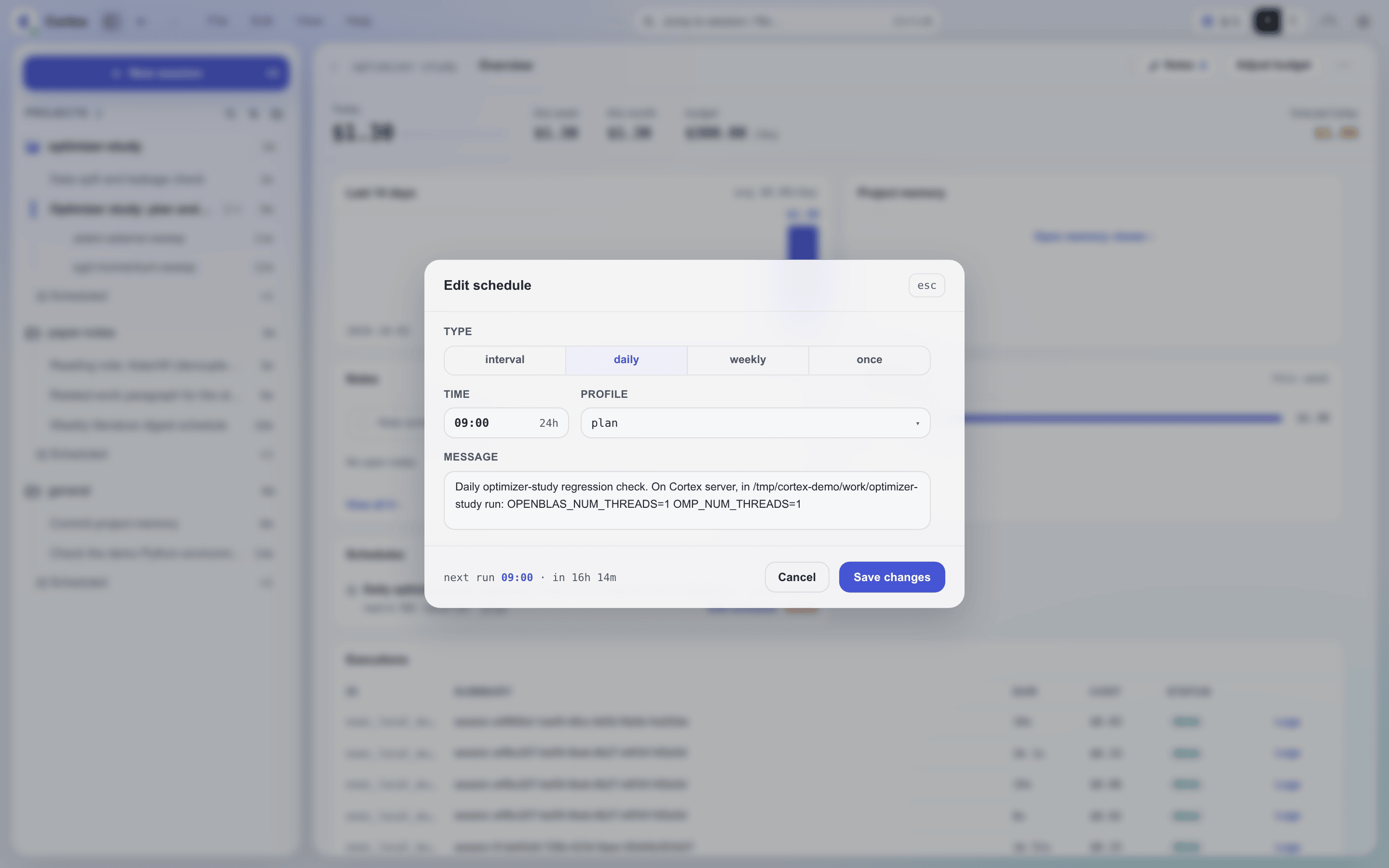
Every entry point applies the same validation and writes the same schedules.json:
| Entry point | Who uses it |
|---|---|
schedule skill → cortex schedule |
Agents inside a session (see Agent workflow) |
cortex schedule |
Scripts and terminals (see CLI) |
!schedule |
Chat commands in Slack or Feishu (see Chat commands) |
| Web UI / desktop app | The schedule list and editor; it sets every field except preCheck, and a once schedule's time is fixed once created |
The Web and mobile editor selects a model and thinking level. CLI and chat
--model accept a model id or PI provider/model and restore its model memory;
--thinking can override the level. Creation or editing stores the complete
selection, and each fire uses that snapshot.
Schedule Records
Each schedule is stored as a JSON object in ~/.cortex/data/schedules.json:
{
  "tasks": [
    {
      "id": "d6f1bb1e",
      "type": "interval",
      "message": "Check the active projects and report blockers",
      "projectId": "general",
      "selection": {
        "backend": "claude",
        "provider": null,
        "model": "haiku",
        "thinking": null,
        "mode": "plan"
      },
      "intervalMs": 3600000,
      "createdAt": 1747680000000,
      "nextRun": 1747683600000,
      "lastRun": 1747680000000
    }
  ]
}
ScheduleTask Fields
| Field | Description |
|---|---|
id |
8-character hex identifier (auto-generated) |
type |
interval, daily, weekly, or once |
message |
The prompt to send when the schedule fires (a [Scheduled Task] prefix is added automatically at fire time) |
projectId |
Project the schedule belongs to; each fire's session opens in it |
selection |
Complete engine choice: backend, provider, model, thinking, and mode. Without an explicit choice, stores the configured default at creation; later default or model-memory changes do not alter existing schedules |
intervalMs |
For interval type: milliseconds between fires |
time |
For daily/weekly types: HH:MM 24-hour time |
dayOfWeek |
For weekly type: 0-6 (0=Sunday) |
runAt |
For once type: epoch milliseconds when to fire |
nextRun |
Computed epoch ms of next scheduled fire |
createdAt |
Epoch ms when the schedule was created |
lastRun |
Epoch ms of the last fire handed to the runner, including one the runner then skipped because the previous run was still going or the selected engine was rate-limited. A once schedule is deleted when it fires and never records one |
lastSkipped |
Epoch ms of last skipped fire (preCheck failed) |
isPaused |
Whether the schedule is currently paused |
pausedAt |
Epoch ms when paused |
pausedBy |
"user" while the schedule is paused |
dispatchType |
Reserved internal handler key; ordinary user schedules omit it |
preCheck |
Optional shell command; non-zero exit → skip this fire |
idempotencyKey |
Set by cortex schedule add --idempotency-key; a retry with the same key returns this schedule |
Built-in periodic jobs
Provider-usage collection and memory-index rebuild are daemon-owned jobs. They do not appear in schedules.json, !schedule list, cortex schedule list, or the Web schedule list. Their switches and intervals are the config/settings.json pairs providerUsageCollectionEnabled / providerUsageCollectionIntervalMs (on, every 5 minutes) and memoryIndexRegenEnabled / memoryIndexRegenIntervalMs (on, every 24 hours). The memory-index pair is also on Settings → Advanced → Built-in jobs.
Enabled jobs run once when the daemon starts. Settings edits hot-reload: disabling a job clears its next timer, enabling it runs immediately, and changing an interval reschedules the next idle run. See configuration.md for defaults and bounds.
Where a fire lands
Every fire opens a new, ordinary session — the same kind you start from the Web
UI or the desktop app — and sends the schedule's message, with a
[Scheduled Task] prefix, as its first turn. The session is recorded as that
schedule's run and labeled with the first 60 characters of the message. A fire
never reuses an earlier run's session, so the runs of a recurring schedule stay
in separate transcripts.
In the workbench, the session rail's Scheduled group shows one row per
schedule. A recurring schedule's row opens the list of its runs; a once
schedule's row opens its run. Replying to a run turns it into an ordinary
conversation, which then moves to the regular session timeline.
The session opens in the schedule's projectId, settled when the schedule is
created. cortex schedule and the Web UI take the project directly and default
to general. Agents pass the intended project explicitly with --project;
!schedule uses the creating channel's registered project, or general. If
the project no longer exists when the schedule fires, the session opens in a
project named in the message, or in general.
PreCheck
The preCheck field is an optional shell command that acts as a gate: if the command exits with a non-zero status, the schedule's fire is skipped for that cycle. The schedule is rescheduled for its next normal interval — there is no fast retry.
The command runs in a shell, off the event loop, with a 15-second timeout. It receives the PRECHECK_LAST_RUN environment variable (epoch ms of the task's lastRun field). The working directory is DATA_DIR (~/.cortex/).
Use cases for preCheck:
- Check if a required file exists before running:
test -f ~/.cortex/data/schedules.json - Check if a process is running:
pgrep -f "python train.py" - Check system load:
[ $(cat /proc/loadavg | cut -d' ' -f1 | cut -d. -f1) -lt 8 ]
Hot-Reload
The daemon's scheduler is the only process that fires schedules. The daemon and
cortex schedule share the persisted records; the CLI writes schedules.json directly.
The scheduler watches it with
fs.watch and, 300ms after the last change:
- Reads the file from disk, bypassing its in-memory copy
- Removes timers for tasks no longer in the file
- Adds timers for new tasks
- Re-arms tasks whose scheduling config changed (detected via config hash comparison)
- Sends an admin notification:
🔄 schedules.json hot-reloaded: +N -M ~P task(s), T total
The scheduler's own writes trigger the watcher too; the reload that follows finds nothing changed and stays silent. Every write — the daemon's included — re-reads the file inside the write, so a change another process made a moment earlier is kept rather than overwritten by a stale copy.
Config Hash for Change Detection
Each task's scheduling-relevant fields are hashed: type, the type-specific timing (intervalMs, time, dayOfWeek, runAt), message, projectId, selection, dispatchType, preCheck, and whether it is paused. If the hash of a task in the file differs from the armed one, the timer is re-armed, so an edit, pause, or resume made by any writer takes effect without a restart.
In-Flight Protection
If a schedule fires while its previous run is still going, the new fire is skipped. This prevents overlapping runs of the same schedule. The skipped fire still counts as the schedule's lastRun, and the next fire follows the normal timing.
Pause and Resume
Pausing
Schedules of type interval, daily, and weekly can be paused. Pausing or resuming a once schedule is refused with an error; it either fires or gets removed.
When paused:
- isPaused is set to true, pausedAt records the timestamp, pausedBy records "user"
- nextRun is set to null
- The in-memory timer is cleared and not re-armed
A paused schedule stays paused until it is resumed. Pausing a paused schedule, or resuming a running one, changes nothing.
Resuming
When resumed:
- isPaused is set to false, pausedAt and pausedBy are cleared
- nextRun is recomputed based on the schedule type (for interval: now + intervalMs; for daily/weekly: the next occurrence)
- The timer is re-armed
Removing
Schedules can be deleted by ID. The timer is cleared and the entry is removed from schedules.json. Removal is idempotent: cortex schedule remove reports "removed": false for an id that does not exist, while the Web UI and !schedule remove report that the schedule was not found.
Startup Behavior
On server startup, the scheduler:
- Drops
oncetasks that are more than 1 minute overdue (past theirrunAt), with an admin notice for each:Schedule <id> skipped (<n>s overdue): <message> - Schedules all remaining tasks with their computed
nextRuntimes. Anintervaltask whosenextRunpassed while the server was down fires immediately; adailyorweeklyfire missed during downtime is not caught up, and the next occurrence is scheduled - Starts the file watcher for hot-reload
- Logs the total task count
Agent workflow
The schedule skill uses cortex schedule for every scheduling operation. The
CLI runs on the Cortex server with its CORTEX_HOME; it does not infer a project
from the calling session or channel. Agents use the user's explicit project, or
resolve the session project from session context or cortex_context, then pass
--project <id> when adding a schedule. If the user requests the current project
but none is available, ask which project to use rather than falling back to
general. Bash is not guaranteed to carry session-specific environment variables,
including on PI. Creating a schedule without model flags stores the configured default
selection, which may differ from the active session. Use --model to pick a model
and --thinking to set its backend-native reasoning level.
Each message must be self-contained: the fired session needs the project, run, machine, and file paths, not references to the conversation that created it.
Daily and weekly times use the server's local timezone. Convert a request in the
user's timezone to the server timezone before setting --time and, for weekly
schedules, --day; report nextRun in the user's timezone. Check the daemon's
actual timezone, including any TZ override. There is no per-schedule timezone;
differing daylight-saving transitions can shift the user's local recurring time.
Clarify uncertain conversions and explain that limitation when it matters.
CLI
cortex schedule manages the same schedules from an agent session, terminal or script. Its subcommands are list, get, add, edit, pause, resume and remove. Every command prints JSON with ISO timestamps, timing comes from explicit flags, and the long prompt can come from stdin:
cortex schedule add --type daily --time 09:00 --project nimbus --message "Summarize yesterday's sessions"
echo "Check training run r42 on trainer" | cortex schedule add --type once --delay 2h --message -
cortex schedule list --project nimbus
cortex schedule get a1b2c3d4
cortex schedule edit a1b2c3d4 --time 10:30
cortex schedule pause a1b2c3d4
cortex schedule remove a1b2c3d4 --dry-run
A timing flag that does not belong to the schedule's type is rejected, and edit cannot change the type; edit --delay on a once schedule sets its fire time to now plus the delay. A running daemon picks the change up within a second. See cli-reference.md for every option.
Chat commands
The !schedule command manages schedules from Slack or Feishu. A schedule added here belongs to the channel's registered project, or general.
| Command | Description |
|---|---|
!schedule / !schedule list |
List all schedules with status and next run time. The first ten get a button: Pause or Resume for a recurring schedule, Remove for a once schedule |
!schedule add interval <duration> [--model <[provider/]model>] [--thinking <level>] <message> |
Repeat every duration (--model comes right after the timing words) |
!schedule add daily <HH:MM> [--model <[provider/]model>] [--thinking <level>] <message> |
Run every day at a time |
!schedule add weekly <day> <HH:MM> [--model <[provider/]model>] [--thinking <level>] <message> |
Run every week on a day |
!schedule add once <duration> [--model <[provider/]model>] [--thinking <level>] <message> |
Run once after a delay |
!schedule pause <id> |
Pause a recurring schedule |
!schedule resume <id> |
Resume a paused schedule |
!schedule remove <id> |
Remove a schedule |
Execution routing
Ordinary schedule records use the scheduled-task runner, which opens a new session for each fire and sends the message with the [Scheduled Task] prefix. A record may instead name an internal handler in dispatchType; the registered keys are auth-expiry-scan and sync-public, and an unregistered dispatchType is logged and skipped rather than interpreted as an agent prompt. Daemon-owned periodic infrastructure uses the built-in job controller and is not routed through schedule persistence.
Rate limits
When the schedule’s selected engine is rate-limited, the fire is skipped with a warning notice. A recurring schedule keeps its timing and fires at its next scheduled time; a once schedule is deleted at fire time and is not retried. Other startup failures, such as an invalid route, also produce a notice. A run that hits a rate limit after starting is paused and resumed like any other session.